
Search engine optimization is undergoing its most dramatic shift since the introduction of featured snippets. With Google increasingly embedding generative responses directly onto the Search Engine Results Page (SERP), business owners and digital marketers face a critical question: How do you know when Google’s AI features are using your website’s content to answer user searches?
The answer lies inside Search Console. Google provides tracking capabilities designed specifically to report when and where google search console ai features—including AI Overviews and conversational AI Mode—cite or feature your website’s pages.
At WindowIT Technologies, we keep our clients at the forefront of search innovation. In this guide, we will walk you through step-by-step how to locate AI reporting in GSC, what data points you can analyze, limitations to account for, and actionable strategies to optimize your content so AI engines pick your website first.
Understanding the Shift: Why Tracking AI Visibility Matters
When users search for complex or multi-part questions, Google frequently triggers an AI Overview or invites users to dive deeper into AI Mode. These models crawl millions of web pages in real-time, synthesize an answer, and provide citations or source cards linking back to the websites that provided the information.
┌─────────────────────────────────────────────────────────────┐
│                    GOOGLE AI SERP LAYOUT                    │
├─────────────────────────────────────────────────────────────┤
│  [ Generative AI Response Box / AI Mode Prompt ]            │
│    ├── Text Summary / Bullet Points                         │
│    └── [ Source Cards / Citation Links ]  <-- (YOUR WEBSITE)│
├─────────────────────────────────────────────────────────────┤
│  [ Standard Organic Search Results (Ten Blue Links) ]       │
└─────────────────────────────────────────────────────────────┘
Being cited in an AI Overview positions your brand as a primary authority. However, because the AI box often satisfies the searcher’s intent right on the SERP, traditional organic click patterns are shifting. Tracking these appearances allows you to monitor your brand’s reach, evaluate brand awareness, and adjust your content strategies accordingly.
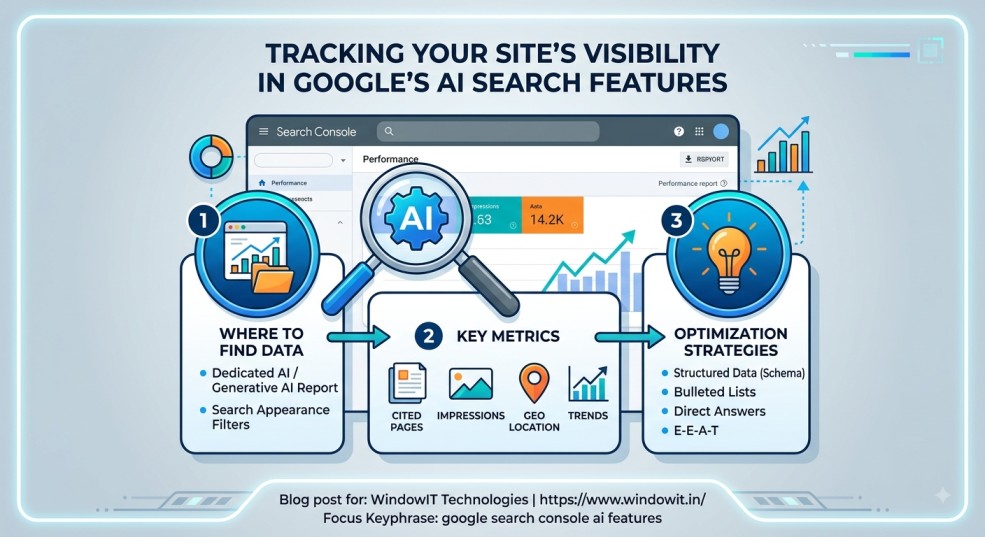
Where to Find AI Data in Google Search Console
Google tracks AI-driven visibility through two primary reporting methods inside Search Console.
Method A: The Dedicated AI / Generative AI Report
Under the Performance section in Google Search Console, Google introduced a specialized generative reporting surface:
-
Direct Access Path: Navigate to
Performance>Generative AI(or access directly at[search.google.com/search-console/performance/search-analytics/ai](https://search.google.com/search-console/performance/search-analytics/ai)). -
What it shows: Aggregated visibility and impression data specifically for web pages pulled into AI Overviews, AI Mode, and generative components in Google Discover.
Method B: Search Appearance Filter in Performance Reports
If you are analyzing your standard Performance report, you can isolate AI visibility by building a custom filter:
-
Log into Google Search Console and click on Performance > Search Results in the left sidebar.
-
Click on the + NEW button in the top filter bar.
-
Choose Search Appearance from the dropdown menu.
-
Check Generative AI, AI Overviews, or AI Mode to isolate data for those specific surfaces.
Breakdown: What Data Google Search Console Provides
When exploring google search console ai features, you get access to several key performance dimensions:
3 Critical Limitations to Keep in Mind
While GSC provides unprecedented transparency into AI visibility, marketers and site owners must account for three significant reporting constraints:
-
Query Masking & Conversational Anonymization: Conversational searches entered into AI Mode are often long-tail and highly detailed. To protect user privacy, Google frequently groups or anonymizes these long-tail conversational prompts. As a result, you may see which pages were cited without seeing every exact query typed by the user.
-
High Impressions vs. Lower Click-Through Rates (CTR): Being cited inside an AI Overview means Google synthesizes your information to give searchers a quick answer. This leads to high impression volumes, but potentially lower direct clicks compared to ranking #1 in standard organic search links. Impression growth inside AI features represents brand impression share and conversational authority.
-
Processing Lag: Generative AI analytics often carry a 24-to-72-hour processing delay as Google aggregates conversational data across global data centers. Always evaluate AI performance trends over 28-day or 90-day windows rather than day-to-day fluctuations.
How to Optimize Your Website to Get Cited by Google AI
Seeing your pages inside google search console ai features requires structuring your content so Google’s Large Language Models (LLMs) can parse, trust, and extract it easily. At WindowIT Technologies, we recommend the following optimization framework:
┌─────────────────────────────────────────────────────────────┐
│                 AI OPTIMIZATION (AEO/GEO)                   │
├─────────────────────────────────────────────────────────────┤
│  1. Direct "Quick Answer" Blocks (H2/H3 + Concise Text)     │
│  2. Structured Data (FAQ, HowTo, & Article Schema Markup)   │
│  3. Clear Data Tables & Bulleted Lists                      │
│  4. Strong First-Party E-E-A-T & Author Credentials         │
└─────────────────────────────────────────────────────────────┘
-
Implement “Quick Answer” Blocks: Place a concise 2–3 sentence definition or direct answer directly below your
H1or majorH2heading tags. AI models favor clear, self-contained factual summaries. -
Leverage Structured Data (Schema.org): Use FAQ, HowTo, Article, and Product schema markup. Structured data makes it easier for search crawlers to identify entities and relationships on your page.
-
Format for Readability: Use Markdown-style tables, numbered sequences, and bulleted lists. AI Overviews frequently pull structured lists to present step-by-step answers.
-
Build Topical Authority: Write comprehensive, interconnected content clusters around your core industry topics. The stronger your site’s overall topical authority, the more likely Google AI will treat your domain as a primary reference source.
Frequently Asked Questions (FAQs)
Why is my website getting high AI impressions but low clicks in Search Console?
AI Overviews summarize web content directly on the SERP to answer queries immediately. When Google cites your page, it registers an impression. While clicks may be lower than traditional top rankings, being cited establishes brand authority and keeps your company visible during high-intent research searches.
How do I enable google search console ai features for my site?
You do not need to apply or change code to enable tracking. If your verified GSC domain property receives impressions from AI Overviews or AI Mode, the data automatically populates inside your Search Console Performance and Search Appearance reports.
Can I block Google AI from using my content without losing organic rankings?
Google provides controls allowing site owners to use max-snippet or nosnippet meta tags to limit how much text Google extracts for preview features. Managing your robots.txt and snippet directives lets you control content usage without de-indexing your pages from standard organic search results.
How can WindowIT Technologies help my business adapt to AI Search?
WindowIT Technologies specializes in advanced SEO, Answer Engine Optimization (AEO), and Generative Engine Optimization (GEO). We audit your existing website, implement structured schema markup, and restructure your content formats to maximize your visibility across both traditional organic search and Google’s AI Overviews.
Contact Information & Next Steps
Unsure if your website is taking advantage of Google’s new AI search landscape? Let the technical SEO experts at WindowIT Technologies analyze your Search Console data and build an AI-ready search strategy for your brand.
-
Company Name: WindowIT Technologies Pvt Ltd
-
Office Address: SCF 61, 1st Floor, Phase 11, Mohali, Punjab – 160062
-
Phone: +91-9876997280 | 0172-4644280
-
Email: windowittech@gmail.com
-
Official Website: https://www.windowit.in/